Sekhar Albums Management — Full-Stack Studio Operations Platform
🎯 The Core Problem
Sekhar Albums is a photography album design studio that works with dozens of studios across Andhra Pradesh. Every week, new album orders pour in — each with its own studio name, sheet count, category, advance amount, and designer assignment. Managing all of this manually using paper notebooks, WhatsApp voice notes, and mental arithmetic was breaking down.
- What was broken?: No single place existed to track which designer was working on which order, what the payment balance was, when the deadline was, or what salary was owed at the end of the month. Everything was scattered.
- The Technical Bottleneck: Salary calculation was the hardest pain point. The owner had to manually count sheets per designer per month, factor in late completions (which carry a ₹5/sheet deduction), subtract any advance payments made mid-month, and arrive at a final net payable figure. Doing this for 6–8 designers every month took half a day and was error-prone.
- The Business Impact: Missed payment follow-ups meant revenue slipping through, incorrect salary payouts caused designer disputes, and no visibility into designer workloads meant new jobs were often assigned to already-overloaded designers — causing cascading delivery delays.
⚡ The Architectural Solution (How I Solved It)
Built using React 18, TypeScript, and Supabase (PostgreSQL), the platform is a complete studio ERP — covering project lifecycle management, studio CRM, designer operations, payment tracking, and payroll.
- Frontend Strategy: Component-driven React with custom hooks for every data domain (
useProjects,useDesigners,usePayments,useDesignerSalary).useMemois used extensively to avoid re-computing filtered tables and salary totals on every render. All heavy table computations (filtering, sorting, pagination) are client-side for instant response with no loading spinners. - Backend & Database: Supabase provides a PostgreSQL database with Row Level Security (RLS) policies. Each user role (Admin, Sekhar User, Regular) can only read/write exactly the rows they're allowed. All business logic (salary formula, penalty calculation, advance deduction) lives in the TypeScript layer, making it auditable and testable.
- Data Integrity: A strict relational schema ties projects → studios → designers → payments → advances.
designer_daily_logsanddesigner_advancesare foreign-keyed to both designers and projects so salary summaries can be computed reliably with no orphaned records.
🗄️ The Database — From Tables to Logic
The database is the backbone of everything. Here is a plain explanation of what each table does:
`studios` Table
Stores every photography studio that sends orders to Sekhar Albums. - Fields: Name, phone number, village/location. - Why it matters: When you add a new project, you pick the studio from this list. The system then automatically tracks how many projects and how much total revenue came from each studio — which shows up on the Dashboard as the Top Studios leaderboard.
`projects` Table
This is the main working table. Each row is one album order.
- Fields: Booking order number, booking date, studio name, village, mobile number, assigned designer(s), total sheets, extra sheets adjustment, album category (A★/A/B/C/Custom), project status (Pending → Running → Completed → Delivered), advance amount, balance amount, total amount, target date, assigned date, completed date, delivered date.
- Why it matters: Every page in the system — dashboard, projects table, deadline tracker, salary calculator — reads from this table. The status field is the heartbeat of the system.
`designers` Table
Stores each album designer's profile. - Fields: Name, phone, hashed password (for mobile portal login), sheet cost rate (₹/sheet), monthly target (sheets), active/inactive status. - Why it matters: The sheet cost rate is the single number used by the salary engine to compute earnings. Different designers can have different rates — one might earn ₹50/sheet, another ₹60/sheet, all configurable by the admin.
`designer_daily_logs` Table
Tracks day-by-day sheet progress per project. - Fields: Designer ID, project ID, date, sheets completed that day, notes. - Why it matters: This is what the Designer Mobile Portal writes to. When a designer logs "Completed 15 sheets today on Order #1042," that entry lands here, letting the admin see real-time progress without calling the designer.
`designer_advances` Table
Records any advance salary payment made to a designer during the month. - Fields: Designer ID, amount, payment date, month-year, payment mode (UPI/Cash/Bank Transfer/Cheque/Other), notes. - Why it matters: At month-end, all advances recorded here are automatically subtracted from the designer's gross salary to give the Net Payable Salary. No manual tracking needed.
`completion_requests` Table
Stores designer-raised requests to mark a project as completed. - Why it matters: Designers cannot directly mark projects as "Completed" — they raise a completion request from their mobile portal. The admin reviews and approves it, preventing unauthorized status changes.
`penalty_overrides` Table
Stores admin decisions to waive or custom-edit the ₹5/sheet late delivery penalty for specific projects. - Why it matters: Sometimes a project is late due to reasons outside the designer's control (client revisions, extra sheets added mid-project). The admin can waive or reduce the penalty for just that project, and the reason is stored for audit.
🛠️ Feature-by-Feature Walkthrough
1. 📊 Dashboard — The Control Room
The dashboard is the first screen every user sees after logging in. It gives a live, at-a-glance overview of the entire studio's operations.
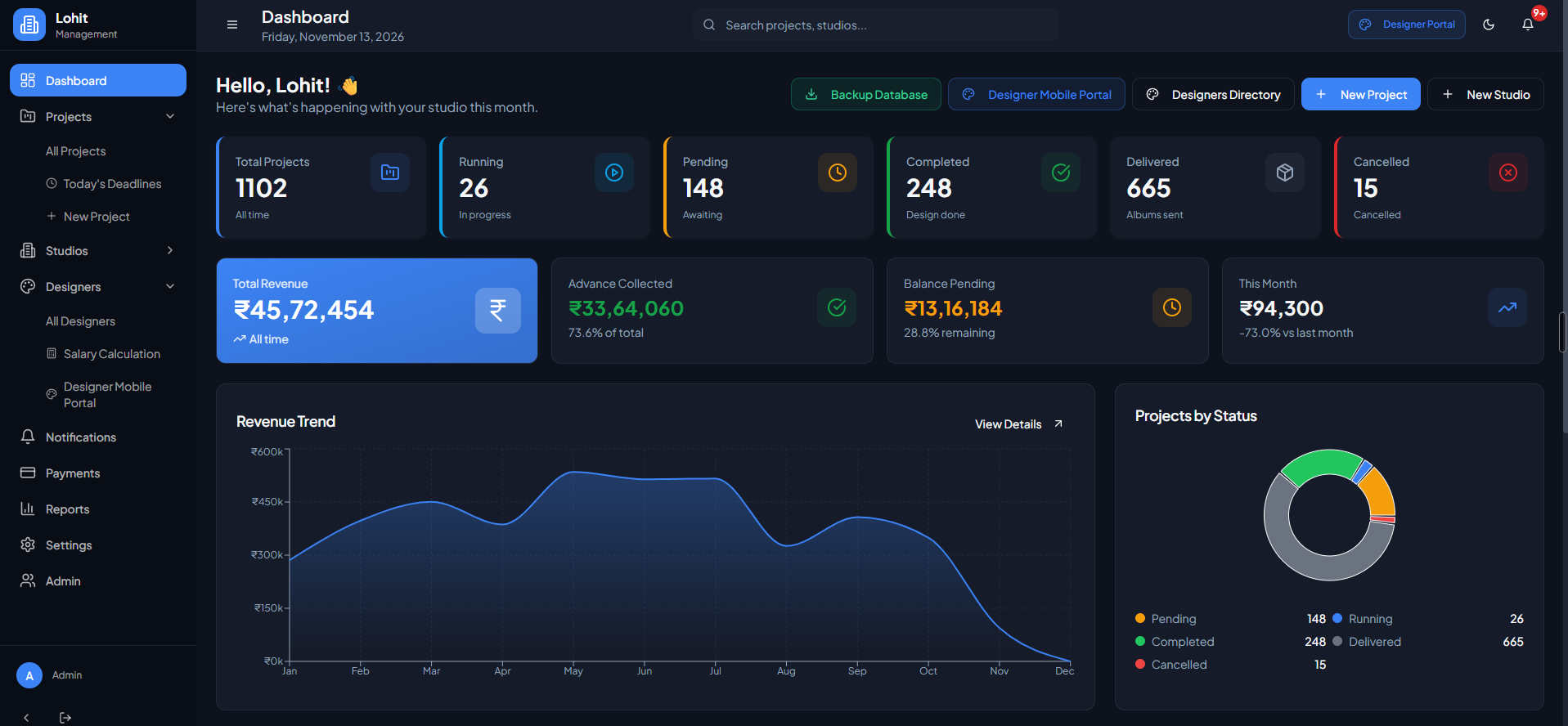
What you see: - 6 Project Status Cards: Total projects, Running, Pending, Completed, Delivered, and Cancelled — each with its count, updating in real time. - 4 Revenue Cards: Total Revenue (all time), Advance Collected, Balance Pending, and This Month's Revenue compared to last month (e.g., "+12.4% vs last month"). - Revenue Trend Chart: An area chart showing monthly revenue over the past several months, so you can spot seasonal patterns. - Projects by Status Pie Chart: A donut chart breaking down all projects by current status visually. - Designer Availability & Workload Planner: A mini-panel showing the top 4 active designers sorted by how many queue sheets they have. It instantly tells you who is FREE NOW (green), who is free Tomorrow (amber), and who is busy for X days (grey with an estimated free date). This saves the time of calling each designer to ask "are you free?" - Top Studios Leaderboard: Shows the top 5 studios by revenue generated, so you know your most valuable clients. - Recent Projects: The last 5 projects added, with their status badge and amount.
Time saved: The studio owner no longer needs to phone designers to check availability before assigning new orders. The dashboard answers that question instantly.
2. 📁 Projects Table — The Master Order Register
This is the central table that replaces the physical order register. Every album order is a row here.
Columns in the table:
| Column | What it shows |
|---|---|
| Order No. | Unique booking ID (e.g., #1042) |
| Booking Date | When the order was placed |
| Target Date | Deadline — color-coded red if overdue |
| Studio Details | Studio name, village, mobile number |
| Direct Contact | One-click call / WhatsApp buttons |
| Designer | Assigned designer's name |
| Sheets & Size | Sheet count, extra adjustments, album size |
| Status | Pending / Running / Completed / Delivered / Cancel badge |
| Assigned / Completed / Delivered | Key milestone dates |
| Total / Advance / Balance | Financial summary per order |
Smart Features: - Overdue Highlighting: Any project past its target date automatically gets a red left border and slight red background. You can see at a glance what needs immediate attention without filtering. - Late Completion Tag: If a project was completed after its target date, the completed date cell shows (Late) in red text. Same for delivered date. - Extra Sheets: If sheets were added after the initial order, they show as +5 in green or -3 in amber — immediately visible without opening the project. - Multi-Filter System: You can filter by status (checkboxes for Pending/Running/Completed/Delivered/Cancel), by category (A★/A/B/C/Custom), by any date field (booking date, target date, assigned date, completed date, delivered date), or search by booking ID, studio name, or designer name. - Interactive Status Cards: Clicking the "Running: 12" card at the top instantly filters the table to show only running projects. Click it again to clear the filter. - Footer Totals: At the bottom of the table, filtered totals are always shown — total projects matched, total sheets, total amount, advance, and balance — so you always know the financial picture for whatever filter you've applied. - Paginated: 10 projects per page with next/prev navigation. - Export to CSV: One-click CSV export of the current filtered view.
3. 💳 Payments Page — Payment History & Tracking
Tracks all balance payments received from studios after delivery.
What it does: - Lists every payment received with the date, amount, associated project, and notes. - Shows summary cards: Total Payments Received, This Month's Collections, and Total Count. - Supports searching by studio name or order number. - Admins can add, edit, and delete payment records. - Export payments to CSV for accounting.
Time saved: No more hunting through WhatsApp chats to remember when a studio last paid. Every payment is timestamped and linked to its project.
4. 🏢 Studios Page — Client CRM
A clean directory of every photography studio that sends business.
What it shows: - Studio name, phone number, village/location. - Total projects and total revenue generated per studio. - Add, edit, or delete studios with full form validation.
Time saved: When a new order comes in from a familiar studio, you don't re-enter contact details. Just select from the studio list and the phone number is already there for WhatsApp messaging.
5. 👨🎨 Designers Page — Workload Planner + Directory
This page has two tabs:
Tab 1: Availability Planner (25 Sheets/Day)
Every active designer gets a card showing: - Their current queue (total sheets in running projects). - How many active orders they have. - An estimated Free Date — calculated by dividing running sheets by the 25 Sheets/Day benchmark. - A color-coded availability badge: - 🟢 FREE NOW — 0 sheets in queue - 🟡 FREE TOMORROW — ≤25 sheets (can finish in a day) - 🟠 ~X Days — 26–75 sheets (moderate workload) - 🔴 BUSY (~Xd) — 75+ sheets (fully loaded) - A workload progress bar (percentage of 75-sheet max capacity). - Inspect Queue button: Opens a side drawer showing exactly which orders are in this designer's queue, with deadlines.
Tab 2: Directory & Passwords
A table of all designers with: - Name and phone number. - Password (admin-only): Masked by default, reveal with eye icon, copy with clipboard icon — this is their mobile portal login password. - Sheet Cost Rate (admin-only): The ₹/sheet rate used in salary calculations. - Availability status badge. - Running orders count and completed projects count. - Edit/Delete actions.
Why this saves enormous time: Before this system, assigning a new order meant calling each designer to ask if they're free. Now the admin opens the Availability Planner tab, sees who is green (free) or yellow (available tomorrow), and assigns the order in seconds.
6. 📅 Deadlines Tracker — Today's Urgent Orders
A dedicated page showing all projects that are due today, overdue, or due within the next few days.
What it shows: - Tabs for: Overdue, Due Today, Due This Week, and All Active Projects. - Each tab shows the project list with status, designer, sheet count, and a live countdown badge (e.g., "2 days left" or "3 days overdue"). - Inline actions to update status or send WhatsApp messages directly. - A top summary showing counts of overdue vs. on-track orders.
Time saved: Instead of scanning the entire project table looking for red-highlighted rows, this page surfaces all urgent items in one place — like a daily to-do list for the studio.
7. 💬 WhatsApp One-Click Messaging — Direct Client Communication
Every project row has a Direct Contact column with two buttons: a phone call button and a WhatsApp button.
The WhatsApp button opens a dropdown with 4 pre-built message templates, each auto-filled with the project's real data:
| Template | When to use |
|---|---|
| 1. Project Started Successfully | When an order is confirmed and design work begins |
| 2. Advance Payment Reminder | When the studio hasn't paid the advance yet |
| 3. Pay Balance for Album Delivery | When the album is ready but balance is pending |
| 4. Thank You & Visit Again | After successful delivery |
How it works: Click a template, and WhatsApp Web opens with the studio's mobile number pre-filled and the full professional message auto-composed in Telugu/English — including the order number, sheet count, total amount, advance paid, balance due, and UPI payment details. Zero typing required.
Time saved: Composing and sending a payment follow-up message manually takes 3–5 minutes per studio, including remembering the balance amount. With this system, it takes 3 seconds.
8. 🎨 Designer Mobile Portal — The Designer's Own App
A separate, lightweight mobile-friendly portal accessible at /designer/login that designers log into using their phone number + password.
What designers can do: - View their assigned projects — only their own orders, no access to other designers' work or any financial data. - Log daily sheet progress — enter how many sheets they completed today on a specific project, add notes. - Submit a Completion Request — when they finish a project, they click "Mark as Complete." This sends a request to the admin for review rather than changing the status directly.
Security: Designers cannot see salary figures, advance records, payment data, or other designers. Their entire session is isolated. Passwords are set and managed by the admin from the Designers Directory page.
Why this matters: Before this, the studio owner had to WhatsApp each designer separately every evening asking for progress updates. Now designers self-report, and the admin sees it in real time on the project detail.
9. 💰 Salary Calculation Engine — The Most Complex Feature
This is the most technically intricate and business-critical feature of the entire platform. It replaces the half-day monthly salary calculation entirely.
How the salary formula works:
Gross Earnings  = Total Sheets Completed × Sheet Cost Rate (₹/sheet)
Late Penalty    = Late Sheets × ₹5 (one-time deduction per late sheet)
Gross Salary    = Gross Earnings − Late Penalty
Advance Paid    = Sum of all designer_advances for this month
Net Payable     = Gross Salary − Advance Paid
What counts as "late"?: A project is late if its completedDate is after its targetDate. Every sheet in that project counts as a late sheet and attracts the ₹5/sheet deduction. If a project has no target date set, it is treated as on-time.
The Salary Page — Step by Step:
Month Navigation: Use arrow buttons or a dropdown to select any month (from 12 months past to 3 months future). The salary engine re-computes everything for the selected month instantly.
Executive Overview Cards (5 cards at the top of the page): 1. Net Salary Payable — Total amount owed to all designers this month (after all deductions). 2. Completed Sheets — Total sheets across all designers, split into on-time vs. late counts. 3. Missed Deadline Deductions — Total ₹ deducted across all designers for late deliveries. 4. Advances Deducted — Total advance amount already paid out this month. 5. Team On-Time Delivery % — What percentage of completed projects were on time — a live performance grade for the entire team.
Main Salary Table: Each row is one designer showing: - Name and status badge. - Monthly target progress bar (e.g., "342/500 sheets"). - Sheet Cost Rate (with a pencil icon to edit it inline). - Sheets Completed, split into on-time and late counts. - Gross Amount. - Late Penalty (shown in red if non-zero). - Advance Paid (with a "+" button to record a new advance right from this row). - Net Remaining to Pay — the final number the owner needs to pay the designer. - On-Time Delivery %. - Click any row to open the Full Breakdown Dialog.
Full Salary Breakdown Dialog (per designer):
This dialog has three tabs:
- Project Items Tab: An itemized table of every project the designer completed this month. For each project you see: Booking Order #, Studio, Sheets, Base Rate, whether it was late, how many days late, penalty per sheet, and Net Earned Amount. - Edit Penalty: Click the edit icon on any row to custom-adjust the penalty per sheet for that project (e.g., set it to ₹3 instead of ₹5) with a reason field for the override. - Waive Penalty: One-click waive — sets the penalty to ₹0 for that project and stores the reason. - Reset Penalty: Restore the default ₹5 penalty if you previously waived it.
- Advances Tab: Lists every advance payment recorded for this designer this month — amount, date, payment mode (UPI/Cash/etc.), and notes. You can add, edit, or delete advance entries.
- Performance Summary Tab: Performance grade (Outstanding / Good / Needs Improvement), average turnaround days, target achievement rate.
Salary Slip PDF Export: For each designer, one button click generates a professional A4 PDF salary slip using jsPDF — with the designer's name, month, project-by-project earnings breakdown table, penalty deductions, advance deductions, and a highlighted Net Payable figure at the bottom. This is printed and signed as the official settlement record.
Full Payroll Excel Export: One button exports the entire team's payroll for the selected month to a .xlsx spreadsheet with all relevant columns — useful for the accountant.
Time saved: What previously took 3–4 hours of manual calculation, WhatsApp back-and-forth, and note-checking at month-end is now completed in under 5 minutes. The salary figures auto-update as new projects get completed and advances get recorded throughout the month.
10. 📈 Reports Page — Business Analytics
Visual charts and tables for business intelligence: - Monthly Revenue Bar Chart: Revenue per month over the past year. - Monthly Project Count Line Chart: How many orders were completed each month. - Status Distribution Pie Chart: Breakdown of all projects by current status. - Category Distribution Chart: Revenue split by album category (A★/A/B/C). - Repeat Customers Table: Studios that have placed more than one order, showing total orders and revenue — valuable for relationship management.
11. 🔔 Notifications Page
System-generated alerts for: - Projects approaching their deadline (within 2 days). - Projects that are overdue. - Designer completion requests awaiting admin approval.
12. 🔐 Role-Based Access Control — 3 Roles, 36+ Permissions
Every feature is gated by a permission check. The system has three roles:
| Role | Access Level |
|---|---|
| Admin | Full access — all features including salary management, designer credentials, exports, reports, user management |
| Sekhar User | Operational access — can add/edit projects, record payments, manage studios and designers, download invoices, but cannot view salary calculations, delete projects, or export Excel |
| Regular User | Read-only access — can view projects, studios, designers, and basic reports. Cannot add, edit, or delete anything |
This means a field employee (Sekhar User) can log new orders and record payments without ever seeing confidential salary or financial export data. The admin retains full control without sharing their password.
13. 💾 Database Backup
Admin-only feature available from the Dashboard. One click exports a full JSON backup of all projects, studios, designers, payments, and advances — timestamped and downloadable — so data is never fully dependent on the cloud service.
📊 Measurable Impact & Production Results
- Salary calculation time: Reduced from ~3–4 hours/month → under 5 minutes with zero arithmetic errors.
- Order assignment speed: Finding a free designer reduced from "call each one" → 3-second visual check on the Availability Planner.
- Payment follow-up: Composing a WhatsApp payment reminder reduced from 3–5 minutes → 3 seconds using pre-built templates.
- Data consistency: RLS policies and relational foreign keys prevent orphaned records, double-counting, and corrupt salary totals.
- Zero paper registers: The physical order book, designer salary notebook, and payment ledger are all fully replaced by this system.
🛠️ Hardest Technical Obstacles & Engineering Battles
1. Salary Engine Correctness Across Month Boundaries
- The Challenge: A project assigned in September but completed in October — which month does it count for salary? The system needed a consistent rule: salary is credited in the month the `completedDate` falls, not when it was assigned or booked.
- The Solution: The salary hook filters
projectswherecompletedDatestarts with the selectedYYYY-MMstring. This is timezone-safe (no UTC offset issues) and deterministic. A separate timezone-safe month navigation was implemented using direct year/month arithmetic rather thanDateobject manipulation to prevent off-by-one errors at month boundaries.
2. Penalty Override Persistence Without Overwriting Computed Defaults
- The Challenge: Admin penalty edits (waive/custom amount/reason) needed to persist when the admin navigated away and came back. But re-computing salary from scratch every load would overwrite manual overrides.
- The Solution: A
penalty_overridestable stores(projectId, designerId, penaltyPerSheet, reason, isWaived). The salary engine reads this table and merges overrides on top of the computed default — manual overrides always win. Resetting deletes the override row and returns to computed default.
3. Real-Time Designer Queue Estimation
- The Challenge: Showing how many days until a designer is free requires knowing their current sheet backlog. But projects have variable sheet counts and no explicit "completion date" prediction.
- The Solution: For each designer, sum all
totalSheetsacross their Running and Pending projects. Divide by 25 (the daily sheet benchmark). This givesestimatedDaysToFree.freeDateis computed as today + that many days. This calculation runs inside theuseDesignershook on every render so it's always current.
4. Designer Portal Security Without a Full Auth System
- The Challenge: Designers needed to log in securely without having Supabase accounts (to keep costs and complexity low). They only know their phone number and a simple password.
- The Solution: Passwords are hashed in the database. The designer portal authenticates by querying Supabase with RLS policies that only expose the designer's own row if the phone + hashed password match. The session is stored in
localStorageand cleared on logout. The portal routes are completely separate from the admin app routes with their own layout.
💡 Key Takeaways & What I Learned
- Trade-offs: Keeping all salary computation in TypeScript (rather than PostgreSQL stored procedures) made the logic readable, testable, and easy to update — at the cost of sending more raw data to the client. For this scale (dozens of designers, hundreds of projects per month), this is the right call.
- Real business logic is always more nuanced than the spec: The penalty override system, the extra sheets field, and the timezone-safe month navigation were all discovered during real use — not planned upfront.
- What I'd do differently at 10x scale: If the studio grew to 50+ designers and thousands of orders per month, I would move salary computation into a PostgreSQL function or Edge Function triggered on a schedule, cache results in a
salary_snapshotstable, and only re-compute when relevant records change.